










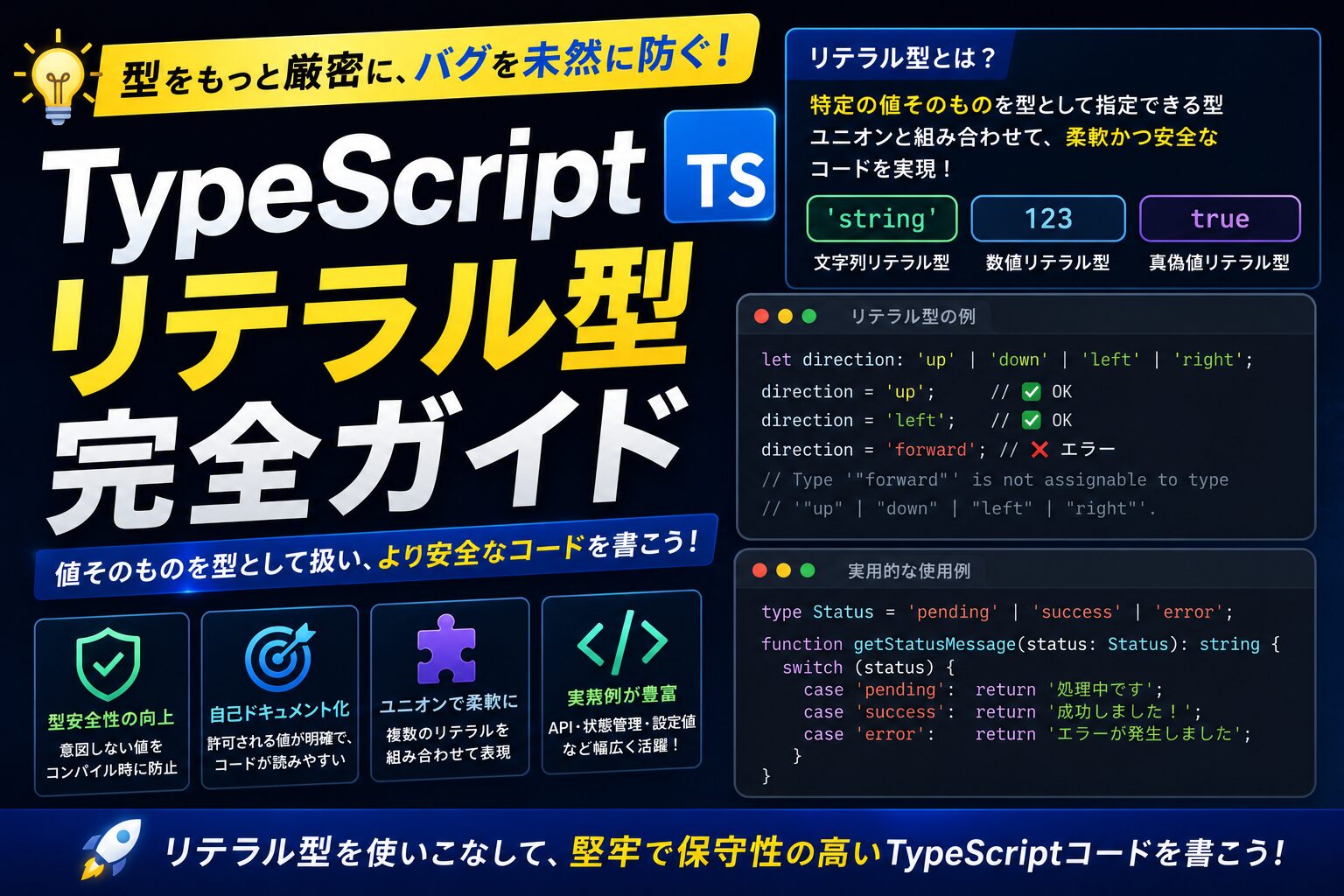
結論から言うと、TypeScriptのリテラル型でCSSクラス名やデザイントークンを型付けすることで、スタイルのタイポ・存在しないバリアントの指定・デザイントークンの誤用をコンパイル時に防げます。文字列でCSSクラスを渡す場合、タイポは実行時まで発見できません。リテラル型を使えばIDEの補完も利き、変更に強いコードが実現します。
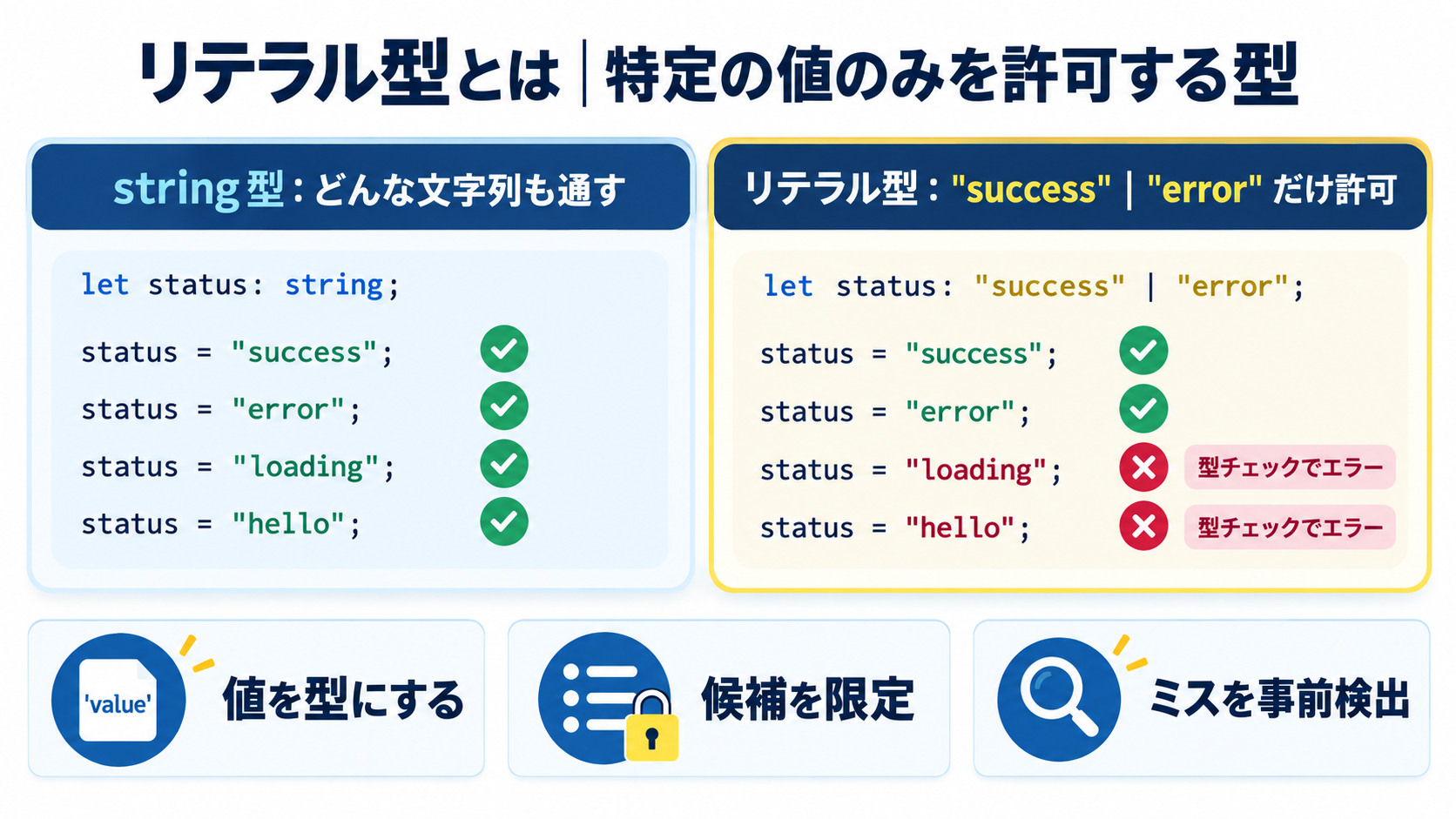
>// 通常の型(string):どんな文字列でも受け付ける
let direction: string = 'top'
direction = 'anything'  // ✅ エラーにならない(タイポも気づかない)

// 文字列リテラル型:特定の文字列のみ受け付ける
type Direction = 'top' | 'right' | 'bottom' | 'left'

let dir: Direction
dir = 'top'     // ✅ OK
dir = 'center'  // ❌ エラー: Type '"center"' is not assignable to type 'Direction'
dir = 'tops'    // ❌ エラー: タイポを即座に検出!

// 数値リテラル型:特定の数値のみ受け付ける
type FontSize = 12 | 14 | 16 | 18 | 24 | 32 | 48 | 64
let size: FontSize
size = 16  // ✅ OK
size = 15  // ❌ エラー: Type '15' is not assignable to type 'FontSize'

// リテラル型の恩恵
// 1. IDEのオートコンプリートで選択肢を表示
// 2. タイポをコンパイル時に検出
// 3. 網羅性チェック(Recordやswitch文で漏れを検出)
// 4. ドキュメント効果(型名を見ると何を渡せるか一目瞭然)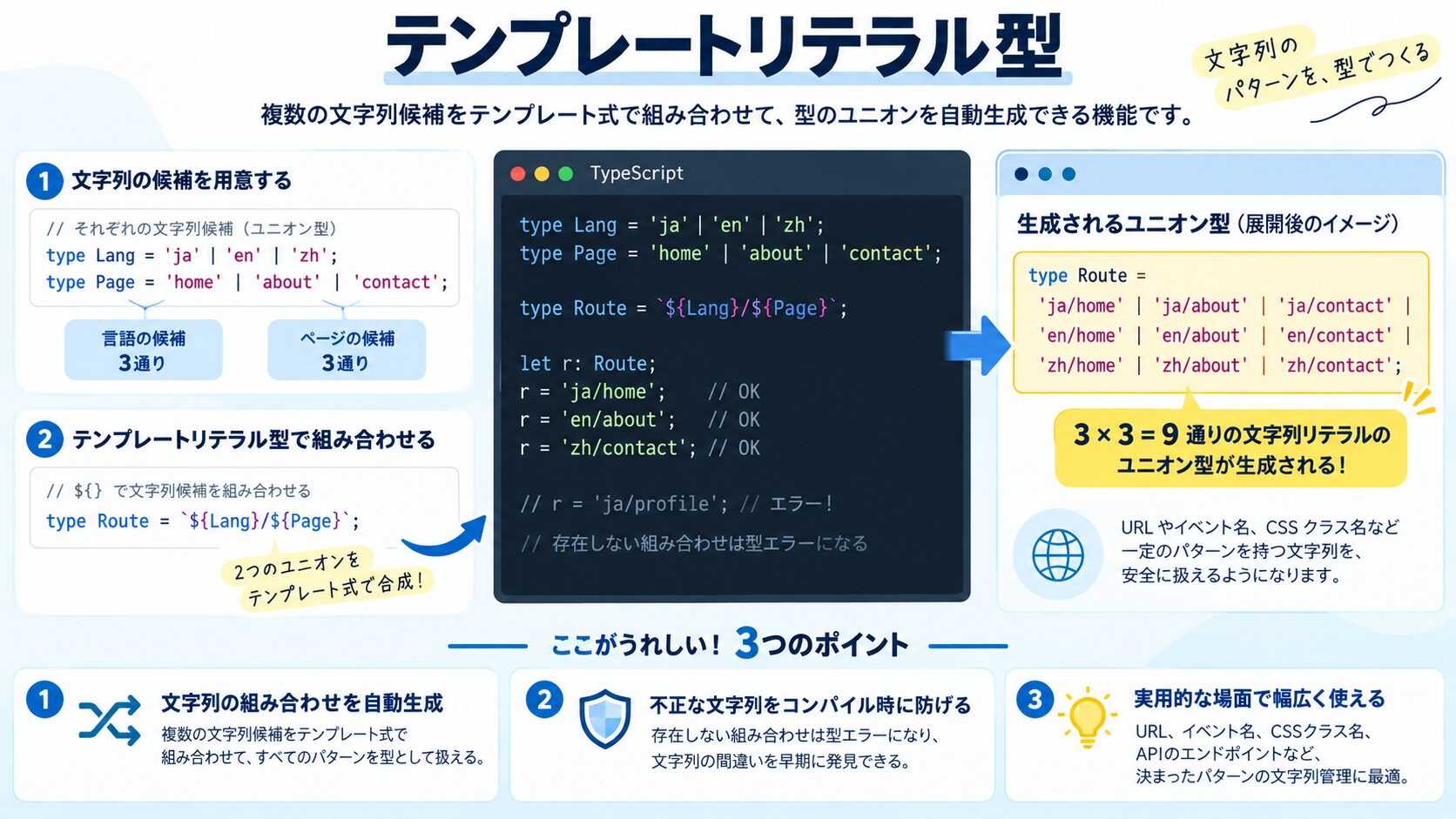
TypeScript 4.1で導入されたテンプレートリテラル型は、文字列テンプレートを型として使えるようにした機能です。CSSのクラス名生成や状態名の定義に特に有効です。
>// テンプレートリテラル型の基本
type Color = 'red' | 'green' | 'blue'
type Size = 'sm' | 'md' | 'lg'

// 2つの型を組み合わせて全組み合わせを自動生成
type ColorSize = `${Color}-${Size}`
// "red-sm" | "red-md" | "red-lg" | "green-sm" | "green-md" | ... (9通り)

type BgClass = `bg-${Color}`
// "bg-red" | "bg-green" | "bg-blue"

// Tailwindのカラースケールを型で表現
type TailwindColor = 'slate' | 'red' | 'orange' | 'yellow' | 'green' | 'blue' | 'violet' | 'pink'
type TailwindScale = 100 | 200 | 300 | 400 | 500 | 600 | 700 | 800 | 900
type TailwindBg = `bg-${TailwindColor}-${TailwindScale}`
// "bg-slate-100" | "bg-slate-200" | ... | "bg-pink-900"(72通り)

function setBackground(className: TailwindBg) {
  document.body.className = className
}

setBackground('bg-blue-500')   // ✅ OK
setBackground('bg-blue-250')   // ❌ エラー: 存在しないスケール
setBackground('bg-purple-500') // ❌ エラー: 定義されていない色

// Capitalize / Lowercase / Uppercase / Uncapitalize(組み込み変換型)
type EventName = 'click' | 'focus' | 'blur'
type HandlerName = `on${Capitalize<EventName>}`  // "onClick" | "onFocus" | "onBlur"

type CSSProperty = 'fontSize' | 'backgroundColor' | 'borderRadius'
type CSSVariable = `--${Lowercase<CSSProperty>}`
// "--fontsize" | "--backgroundcolor" | "--borderradius"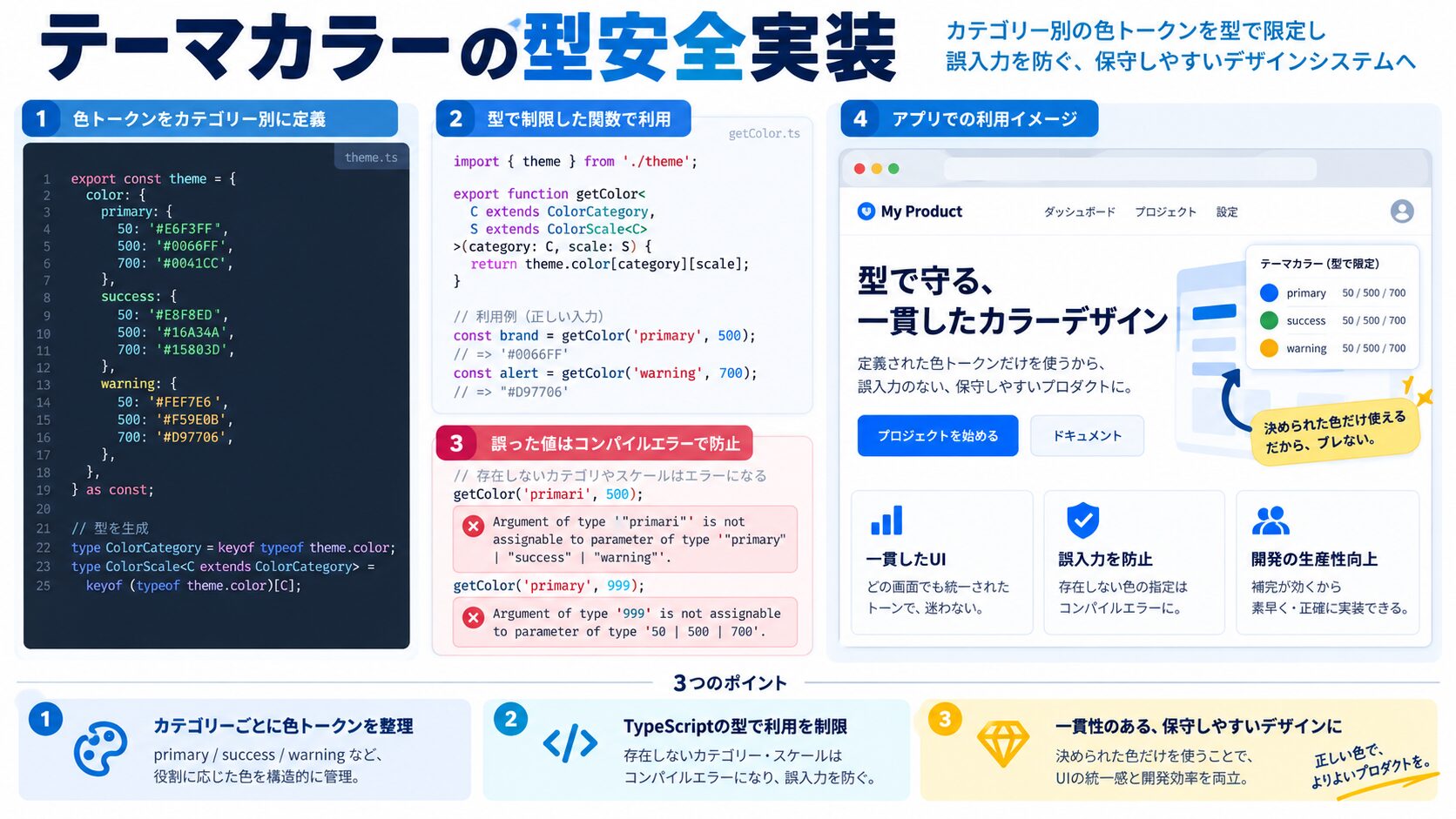
>// types/category.ts

// カテゴリーをリテラル型で定義(文字列の制約)
export type Category = 'technology' | 'health' | 'finance' | 'lifestyle' | 'travel'

export type Article = {
  id: number
  title: string
  content: string
  category: Category  // ← 5つの値しか受け付けない
  publishedAt: string
}

// Categoryを追加した場合:
// → Record<Category, string> 側にエラーが出て追加漏れを防げる!
>// utils/category/color.ts
import type { Category } from '@/types/category'
// カテゴリー → Tailwind CSSクラスへのマッピング
// Record<Category, string> で全カテゴリーのマッピングが必須になる
const CATEGORY_CONFIG: Record<Category, {
bg: string
text: string
border: string
label: string
}> = {
technology: {
bg: 'bg-green-100',
text: 'text-green-800',
border: 'border-green-300',
label: 'テクノロジー',
},
health: {
bg: 'bg-amber-100',
text: 'text-amber-800',
border: 'border-amber-300',
label: 'ヘルス',
},
finance: {
bg: 'bg-cyan-100',
text: 'text-cyan-800',
border: 'border-cyan-300',
label: 'ファイナンス',
},
lifestyle: {
bg: 'bg-yellow-100',
text: 'text-yellow-800',
border: 'border-yellow-300',
label: 'ライフスタイル',
},
travel: {
bg: 'bg-pink-100',
text: 'text-pink-800',
border: 'border-pink-300',
label: '旅行',
},
}
// 型安全なテーマ取得関数
export function getCategoryConfig(category: Category) {
return CATEGORY_CONFIG[category]
// 存在しないカテゴリーを渡すとコンパイルエラー
// マッピングに漏れがあればTypeScriptが警告
}
// カテゴリーバッジコンポーネント
interface CategoryBadgeProps {
category: Category
size?: 'sm' | 'md' | 'lg'
}
export function CategoryBadge({ category, size = 'md' }: CategoryBadgeProps) {
const config = getCategoryConfig(category)
const sizeClass = { sm: 'text-xs px-2 py-0.5', md: 'text-sm px-2.5 py-1', lg: 'text-base px-3 py-1.5' }[size]
return (
<span className={`
${config.bg} ${config.text} ${config.border}
${sizeClass}
border rounded-full font-medium
`}>
{config.label}
</span>
)
}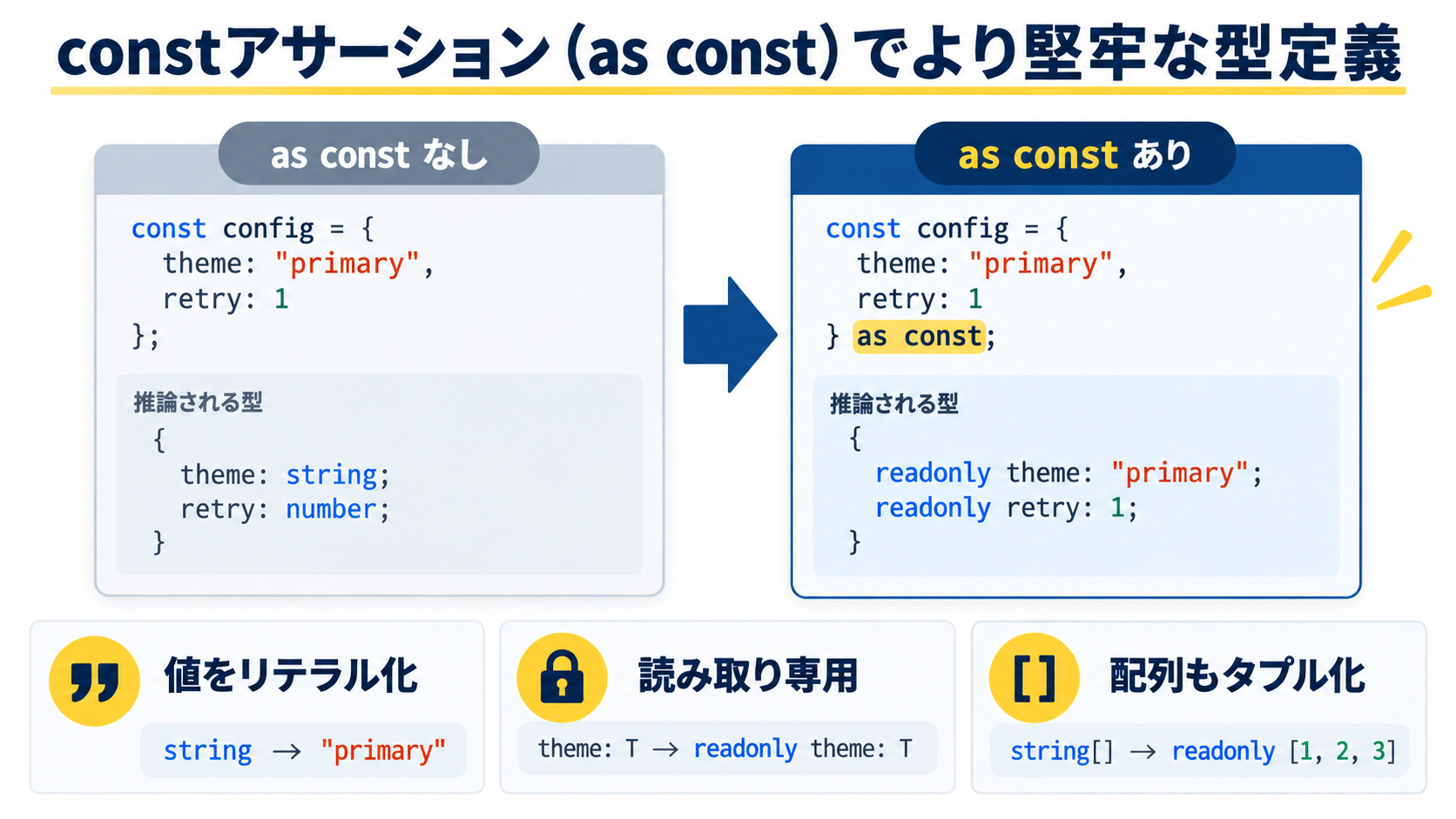
>// as const で定数オブジェクトをリテラル型に変換する

// as const なし(一般的な型になる)
const COLORS = {
  primary: '#3B82F6',   // → 型: string
  success: '#10B981',   // → 型: string
}

// as const あり(リテラル型になる)
const COLORS = {
  primary: '#3B82F6',   // → 型: "#3B82F6"(完全なリテラル型)
  secondary: '#6B7280', // → 型: "#6B7280"
  success: '#10B981',   // → 型: "#10B981"
  danger: '#EF4444',    // → 型: "#EF4444"
  warning: '#F59E0B',   // → 型: "#F59E0B"
} as const

// キーの型を抽出
type ColorKey = keyof typeof COLORS
// → "primary" | "secondary" | "success" | "danger" | "warning"

// 値の型を抽出
type ColorValue = typeof COLORS[ColorKey]
// → "#3B82F6" | "#6B7280" | "#10B981" | "#EF4444" | "#F59E0B"

// 型安全なカラー参照関数
function getColor(key: ColorKey): ColorValue {
  return COLORS[key]
  // 存在しないキーを渡すとコンパイルエラー
}

// 配列でも使える
const BREAKPOINTS = [480, 768, 1024, 1280, 1536] as const
type Breakpoint = typeof BREAKPOINTS[number]  // 480 | 768 | 1024 | 1280 | 1536

// ネストしたオブジェクト
const THEME = {
  colors: {
    primary: { 100: '#EBF5FB', 500: '#3B82F6', 900: '#1E3A8A' },
    gray: { 100: '#F3F4F6', 500: '#6B7280', 900: '#111827' },
  },
  fontSizes: { xs: '0.75rem', sm: '0.875rem', base: '1rem', lg: '1.125rem' },
} as const

type ThemeColors = typeof THEME['colors']
type PrimaryShade = keyof typeof THEME['colors']['primary']  // 100 | 500 | 900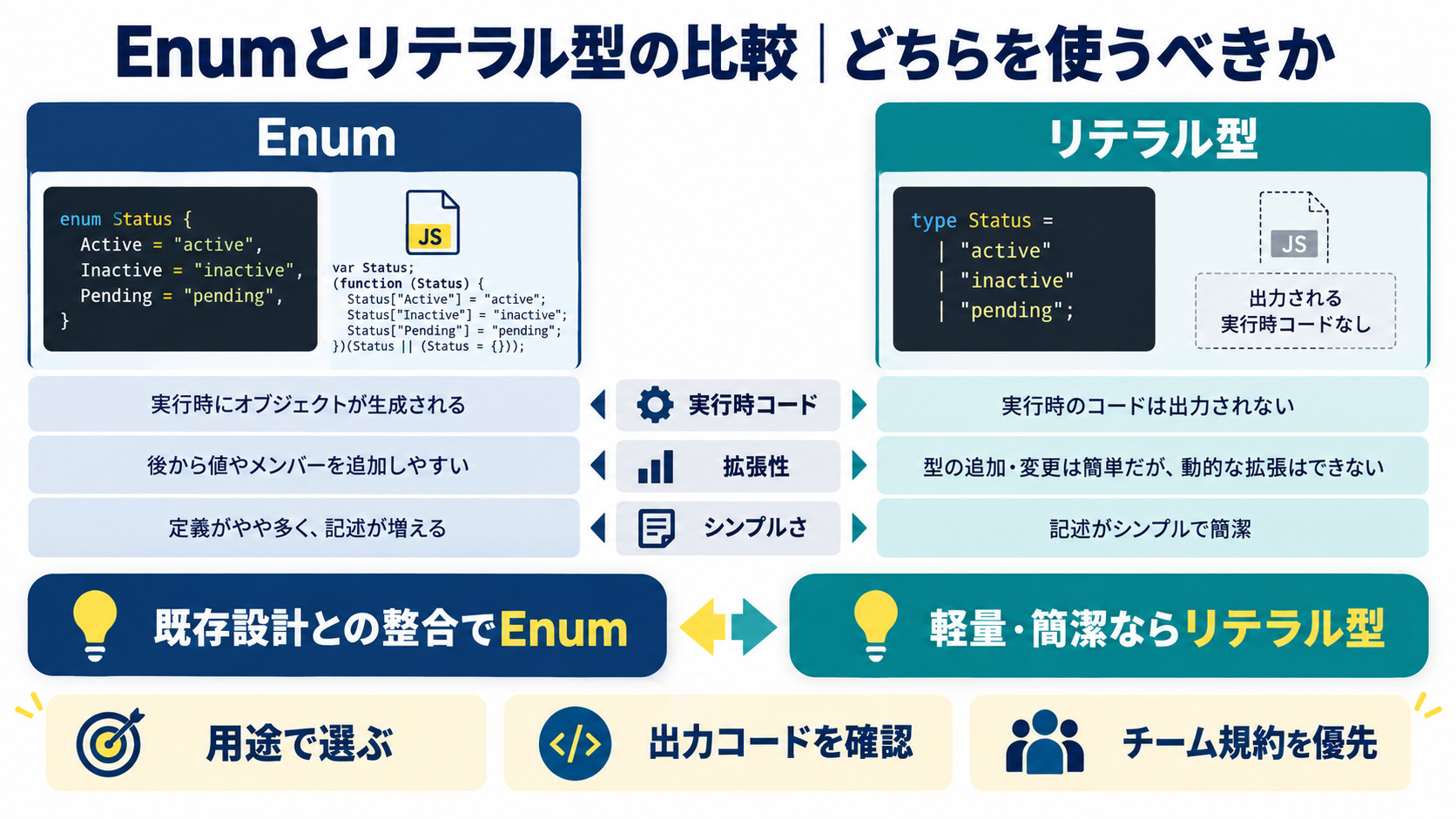
| 比較項目 | 文字列リテラル型(Union) | TypeScript Enum | const Object(Enum代替) |
|---|---|---|---|
| 型の値 | そのまま使える(’active’) | 列挙型専用(Status.Active) | そのまま使える(Status.Active = ‘active’) |
| IDEサポート | ◎ | ◎ | ◎ |
| バンドルサイズ | ◎(型は消える) | △(ランタイムコードが生成される) | ◎(const は最適化可能) |
| JSON互換 | ◎(そのまま) | △(数値Enumは注意) | ◎ |
| 定数名の意味 | △(定数名なし) | ○ | ◎(SomeEnum.VALUE で明確) |
>// ✅ 推奨:const Object + Union型(Enum代替パターン)
const Status = {
  Active: 'active',
  Inactive: 'inactive',
  Pending: 'pending',
} as const
type Status = (typeof Status)[keyof typeof Status]
// type Status = "active" | "inactive" | "pending"

// 使い方(Enum同様に意図が明確)
function updateStatus(status: Status) {
  console.log(status)
}
updateStatus(Status.Active)  // 'active'
updateStatus('active')       // ← これも受け付ける(Union型なので)

// どちらも受け付けるため、アプリコード内では Status.Active を使う規約にすることを推奨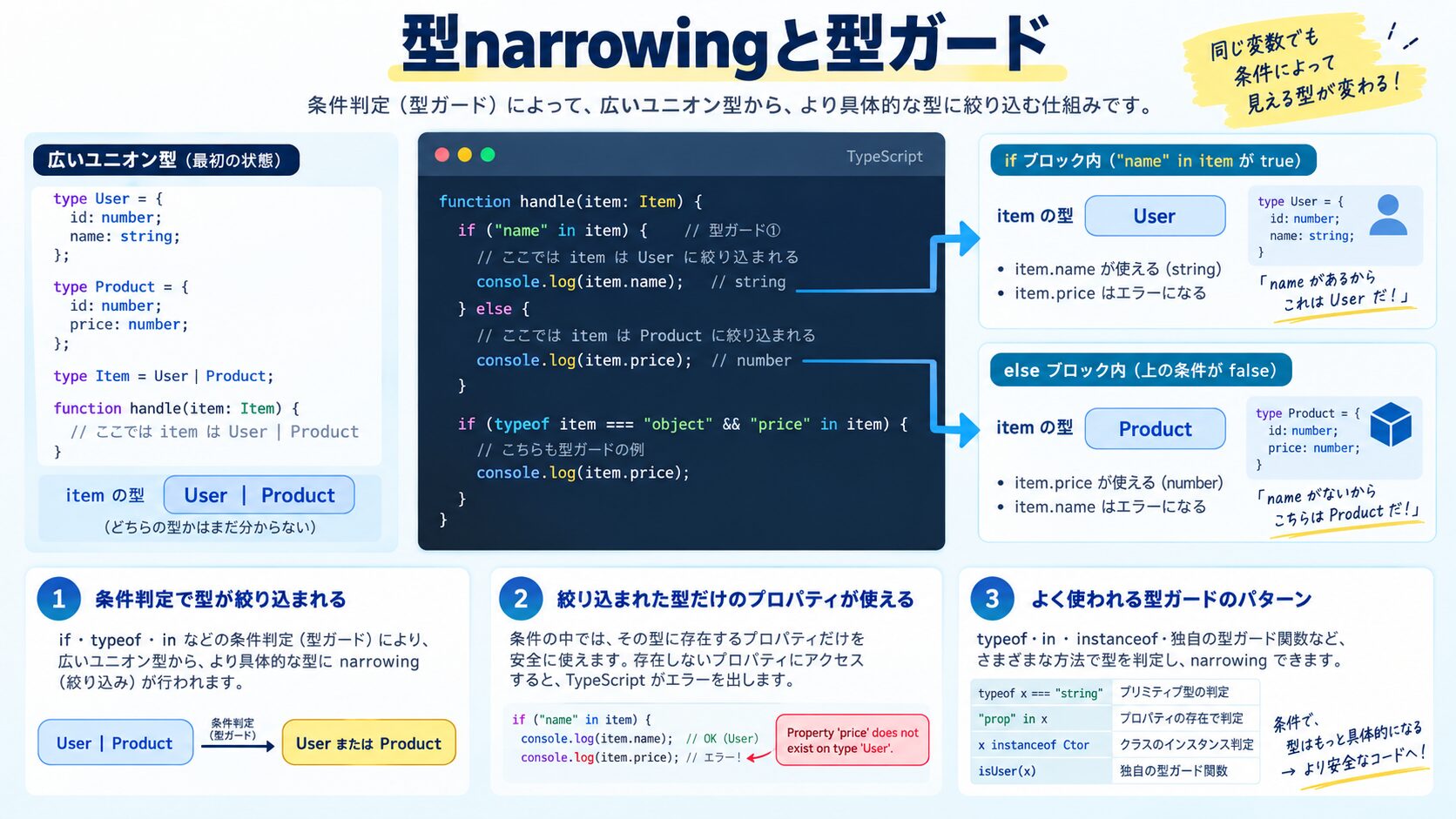
>// 型narrowing:条件によって型を絞り込む
type Shape =
  | { kind: 'circle'; radius: number }
  | { kind: 'rectangle'; width: number; height: number }
  | { kind: 'triangle'; base: number; height: number }

function getArea(shape: Shape): number {
  // switch文のkindプロパティ(discriminated union)でnarrowingする
  switch (shape.kind) {
    case 'circle':
      return Math.PI * shape.radius ** 2  // ここではshape.radiusが確実に存在
    case 'rectangle':
      return shape.width * shape.height   // ここではshape.widthが確実に存在
    case 'triangle':
      return (shape.base * shape.height) / 2
    default:
      // TypeScriptが全ケースをカバーしているか検証する技法
      const exhaustiveCheck: never = shape
      throw new Error(`Unknown shape: ${exhaustiveCheck}`)
  }
}

// CSS バリアントでの discriminated union 活用
type ButtonVariant =
  | { variant: 'primary'; loading?: boolean }
  | { variant: 'secondary' }
  | { variant: 'danger'; confirmText?: string }
  | { variant: 'ghost' }

function getButtonClass(props: ButtonVariant): string {
  switch (props.variant) {
    case 'primary':
      return props.loading ? 'btn-primary opacity-50 cursor-wait' : 'btn-primary'
    case 'secondary':
      return 'btn-secondary'
    case 'danger':
      return 'btn-danger'
    case 'ghost':
      return 'btn-ghost'
  }
}

// ユーザー定義型ガード
type Category = 'technology' | 'health' | 'finance'

function isCategory(value: string): value is Category {
  return ['technology', 'health', 'finance'].includes(value)
}

// 使い方(unknownから安全にCategory型に変換)
const input = document.getElementById('category')?.getAttribute('value') // string | null

if (input && isCategory(input)) {
  // ここでは input: Category として扱える
  const config = getCategoryConfig(input)  // 型安全
}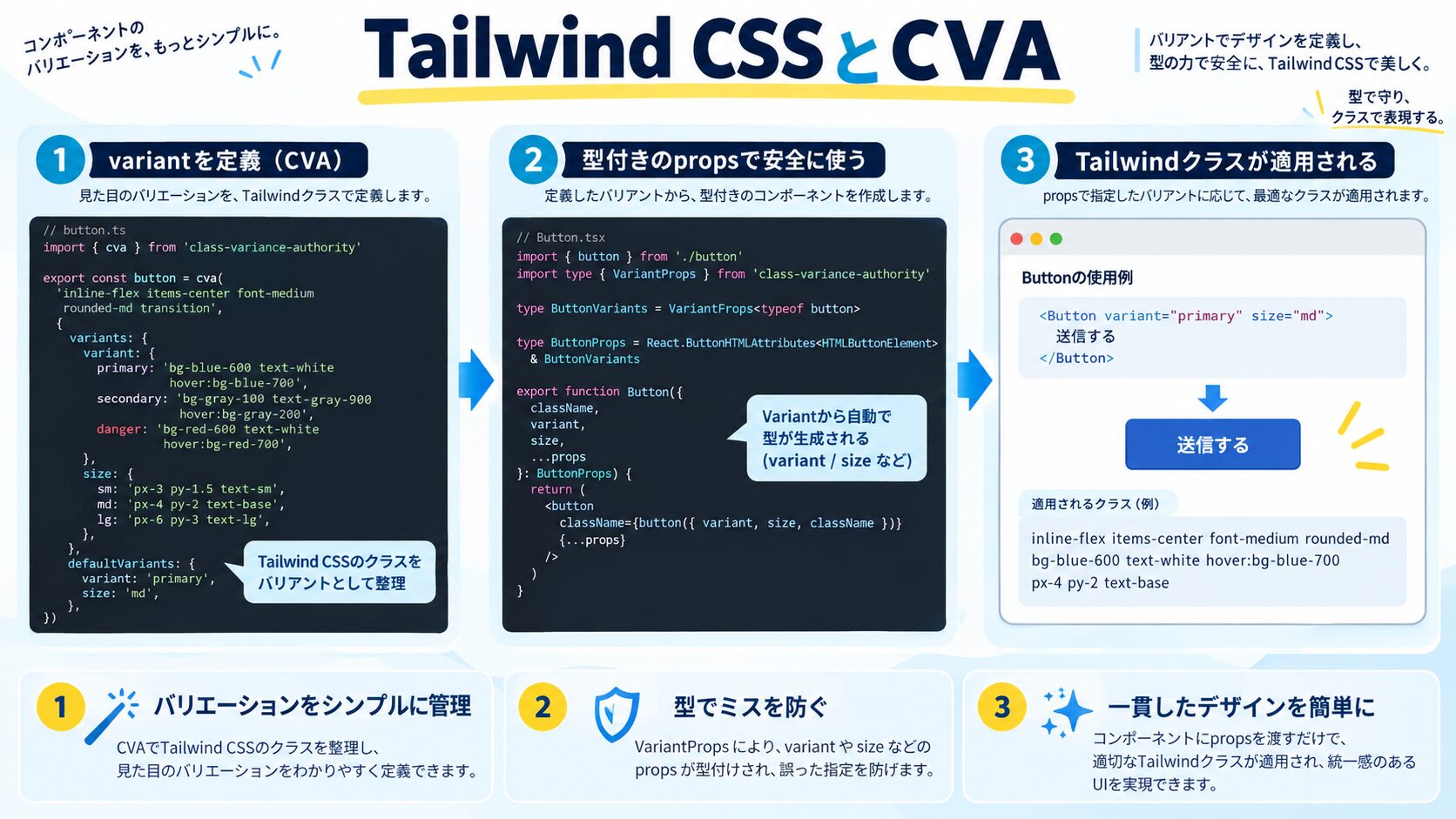
>// cva (class-variance-authority) のインストール
// npm install class-variance-authority

// components/Button/Button.tsx
import { cva, type VariantProps } from 'class-variance-authority'

// バリアントの定義(リテラル型で型安全)
const buttonVariants = cva(
  // ベースクラス(常に適用)
  'inline-flex items-center justify-center rounded-md text-sm font-medium transition-colors focus:outline-none focus:ring-2 focus:ring-offset-2 disabled:opacity-50 disabled:cursor-not-allowed',
  {
    variants: {
      // バリアントの定義
      variant: {
        primary: 'bg-blue-600 text-white hover:bg-blue-700 focus:ring-blue-500',
        secondary: 'bg-gray-200 text-gray-900 hover:bg-gray-300 focus:ring-gray-500',
        danger: 'bg-red-600 text-white hover:bg-red-700 focus:ring-red-500',
        ghost: 'bg-transparent hover:bg-gray-100 text-gray-700 focus:ring-gray-500',
        outline: 'border-2 border-blue-600 text-blue-600 hover:bg-blue-50 focus:ring-blue-500',
      },
      size: {
        sm: 'h-8 px-3 text-xs',
        md: 'h-10 px-4 text-sm',
        lg: 'h-12 px-6 text-base',
        icon: 'h-10 w-10 p-0',
      },
      fullWidth: {
        true: 'w-full',
      },
    },
    // バリアントの組み合わせによる追加クラス
    compoundVariants: [
      {
        variant: 'primary',
        size: 'lg',
        class: 'shadow-lg',
      },
      {
        variant: 'ghost',
        size: 'sm',
        class: 'rounded-full',
      },
    ],
    // デフォルトバリアント
    defaultVariants: {
      variant: 'primary',
      size: 'md',
    },
  }
)

// VariantProps で型を自動取得
export interface ButtonProps
  extends React.ButtonHTMLAttributes<HTMLButtonElement>,
    VariantProps<typeof buttonVariants> {
  loading?: boolean
  leftIcon?: React.ReactNode
  rightIcon?: React.ReactNode
}

export function Button({
  className,
  variant,
  size,
  fullWidth,
  loading,
  leftIcon,
  rightIcon,
  children,
  disabled,
  ...props
}: ButtonProps) {
  return (
    <button
      className={buttonVariants({ variant, size, fullWidth, className })}
      disabled={disabled || loading}
      aria-busy={loading}
      {...props}
    >
      {loading ? (
        <svg className="animate-spin h-4 w-4 mr-2" viewBox="0 0 24 24">
          {/* スピナーSVG */}
        </svg>
      ) : leftIcon}
      {children}
      {!loading && rightIcon}
    </button>
  )
}

// 使い方(型補完が効く)
// <Button variant="primary" size="lg">送信</Button>
// <Button variant="danger" size="sm" fullWidth>削除</Button>
// <Button variant="invalid" /> ← ❌ TypeScriptエラー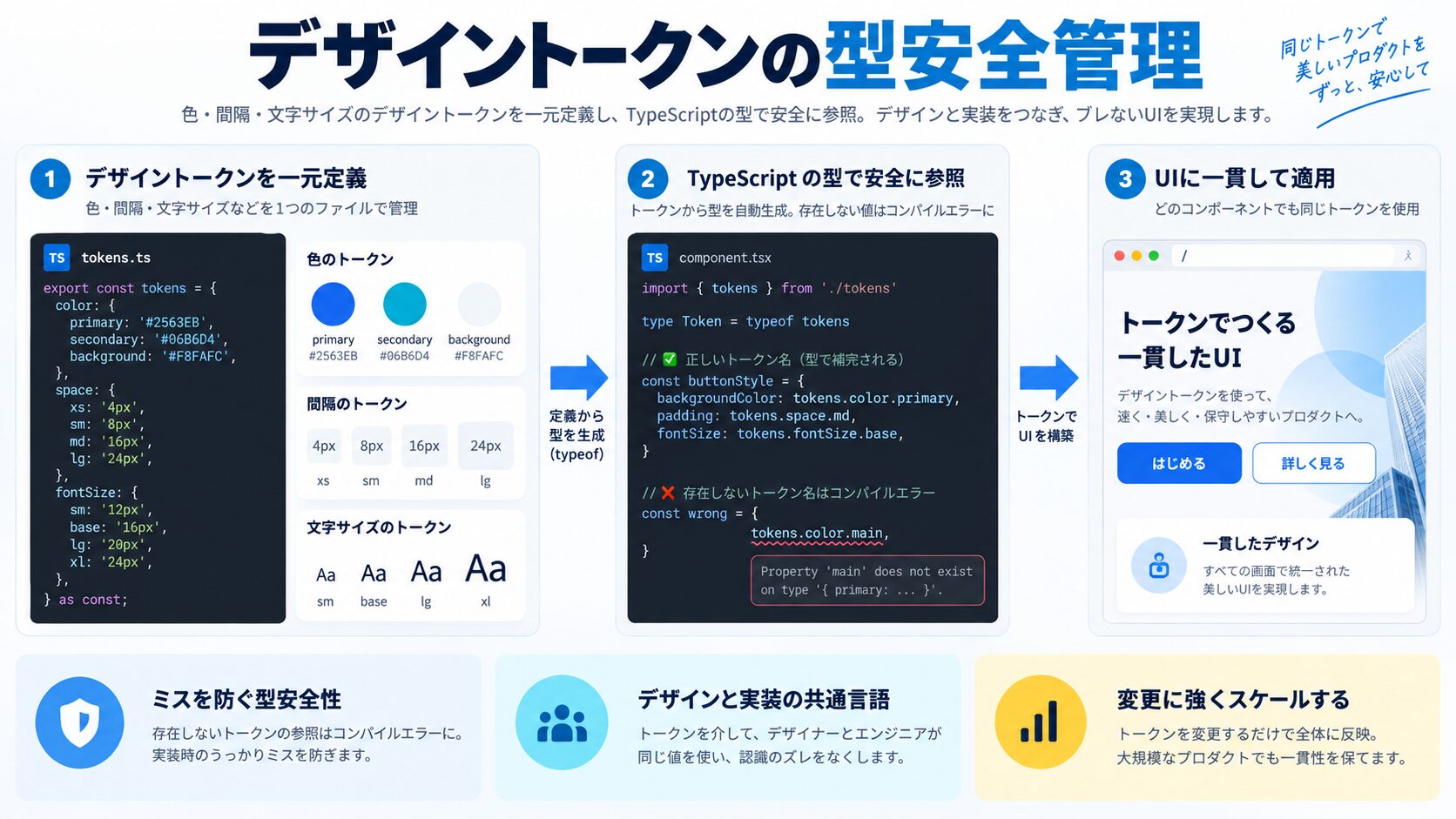
>// design-tokens.ts
// デザイントークンをTypeScriptで型安全に管理する

const tokens = {
  // カラートークン
  color: {
    brand: {
      primary: '#3B82F6',   // Blue-500
      secondary: '#8B5CF6', // Violet-500
      accent: '#EC4899',    // Pink-500
    },
    semantic: {
      success: '#10B981',  // Emerald-500
      warning: '#F59E0B',  // Amber-500
      error: '#EF4444',    // Red-500
      info: '#6366F1',     // Indigo-500
    },
    neutral: {
      '50': '#F9FAFB',
      '100': '#F3F4F6',
      '200': '#E5E7EB',
      '300': '#D1D5DB',
      '400': '#9CA3AF',
      '500': '#6B7280',
      '600': '#4B5563',
      '700': '#374151',
      '800': '#1F2937',
      '900': '#111827',
    },
  },
  // スペーシングトークン
  space: {
    '0': '0',
    '1': '0.25rem',  // 4px
    '2': '0.5rem',   // 8px
    '3': '0.75rem',  // 12px
    '4': '1rem',     // 16px
    '5': '1.25rem',  // 20px
    '6': '1.5rem',   // 24px
    '8': '2rem',     // 32px
    '10': '2.5rem',  // 40px
    '12': '3rem',    // 48px
    '16': '4rem',    // 64px
  },
  // タイポグラフィトークン
  fontSize: {
    xs: ['0.75rem', { lineHeight: '1rem' }],
    sm: ['0.875rem', { lineHeight: '1.25rem' }],
    base: ['1rem', { lineHeight: '1.5rem' }],
    lg: ['1.125rem', { lineHeight: '1.75rem' }],
    xl: ['1.25rem', { lineHeight: '1.75rem' }],
    '2xl': ['1.5rem', { lineHeight: '2rem' }],
    '3xl': ['1.875rem', { lineHeight: '2.25rem' }],
    '4xl': ['2.25rem', { lineHeight: '2.5rem' }],
  },
  // ボーダーラジウストークン
  borderRadius: {
    none: '0',
    sm: '0.125rem',
    base: '0.25rem',
    md: '0.375rem',
    lg: '0.5rem',
    xl: '0.75rem',
    '2xl': '1rem',
    full: '9999px',
  },
} as const

// 型の自動生成
type ColorBrand = keyof typeof tokens.color.brand
type ColorSemantic = keyof typeof tokens.color.semantic
type SpaceKey = keyof typeof tokens.space
type FontSizeKey = keyof typeof tokens.fontSize
type RadiusKey = keyof typeof tokens.borderRadius

// トークンアクセサー関数(型安全)
export const token = {
  color: {
    brand: (key: ColorBrand) => tokens.color.brand[key],
    semantic: (key: ColorSemantic) => tokens.color.semantic[key],
  },
  space: (key: SpaceKey) => tokens.space[key],
  fontSize: (key: FontSizeKey) => tokens.fontSize[key],
  radius: (key: RadiusKey) => tokens.borderRadius[key],
}

// 使い方
const primary = token.color.brand('primary')   // "#3B82F6"(型: "#3B82F6")
const invalid = token.color.brand('tertiary')  // ❌ エラー: 存在しないキー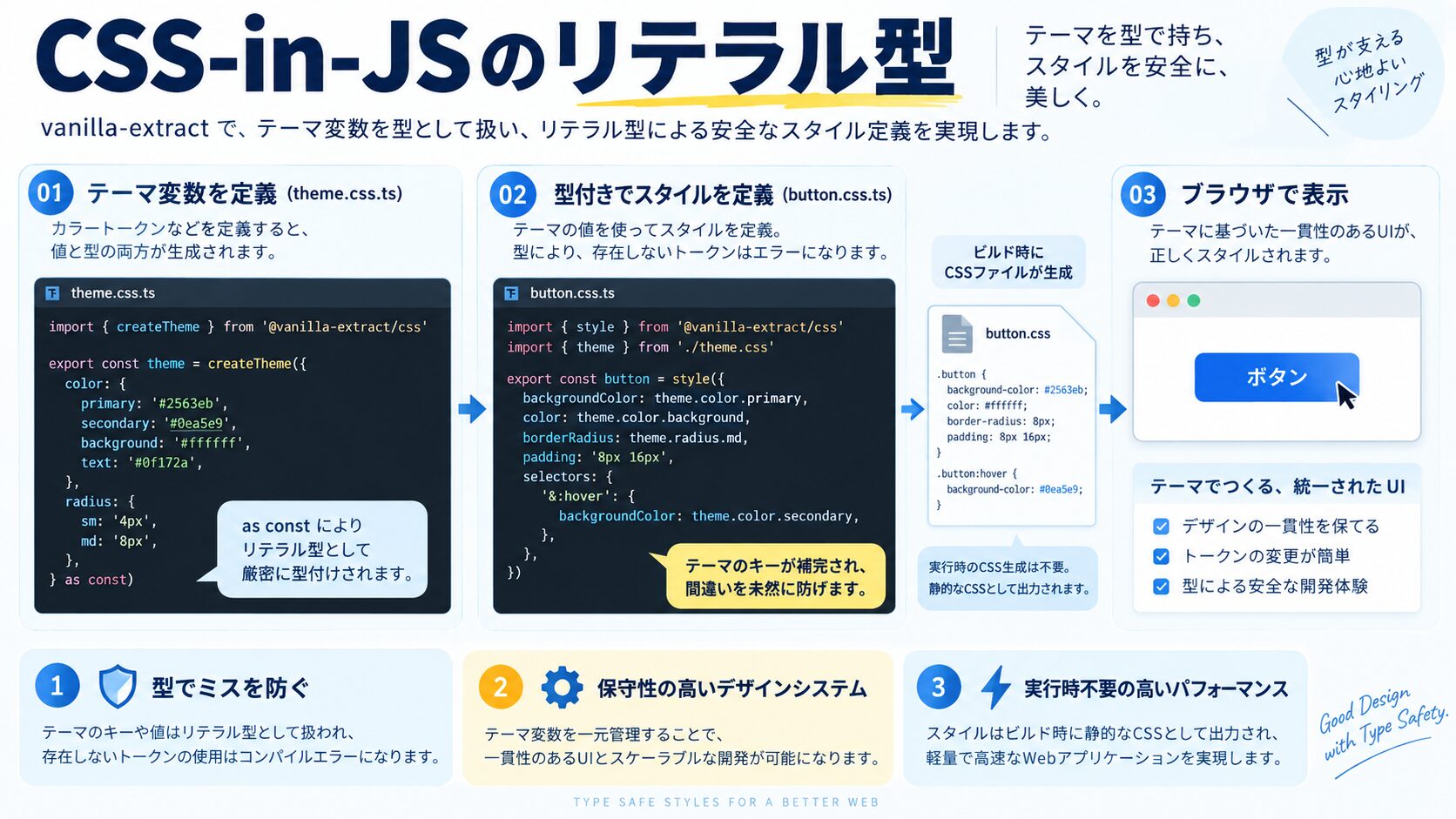
>// styles/theme.css.ts(vanilla-extract)

import { createTheme, createGlobalTheme } from '@vanilla-extract/css'
import { tokens } from './design-tokens'

// テーマ変数を型安全に定義
export const [lightTheme, vars] = createTheme({
  color: {
    primary: tokens.color.brand.primary,
    secondary: tokens.color.brand.secondary,
    text: tokens.color.neutral['900'],
    textMuted: tokens.color.neutral['500'],
    background: tokens.color.neutral['50'],
    border: tokens.color.neutral['200'],
  },
  space: {
    sm: tokens.space['2'],
    md: tokens.space['4'],
    lg: tokens.space['6'],
    xl: tokens.space['8'],
  },
  fontFamily: {
    sans: '-apple-system, BlinkMacSystemFont, "Segoe UI", Roboto, sans-serif',
    mono: '"SFMono-Regular", Consolas, "Liberation Mono", Menlo, monospace',
  },
})

// ダークテーマ(light themeの変数を上書き)
export const darkTheme = createTheme(vars, {
  color: {
    primary: tokens.color.brand.secondary,
    secondary: tokens.color.brand.primary,
    text: tokens.color.neutral['50'],
    textMuted: tokens.color.neutral['400'],
    background: tokens.color.neutral['900'],
    border: tokens.color.neutral['700'],
  },
  space: {
    sm: tokens.space['2'],
    md: tokens.space['4'],
    lg: tokens.space['6'],
    xl: tokens.space['8'],
  },
  fontFamily: {
    sans: '-apple-system, BlinkMacSystemFont, "Segoe UI", Roboto, sans-serif',
    mono: '"SFMono-Regular", Consolas, "Liberation Mono", Menlo, monospace',
  },
})
>// styles/button.css.ts(vanilla-extract でのバリアント定義)
import { style, styleVariants, composeStyles } from '@vanilla-extract/css'
import { recipe, RecipeVariants } from '@vanilla-extract/recipes'
import { vars } from './theme.css'
export const button = recipe({
base: {
display: 'inline-flex',
alignItems: 'center',
justifyContent: 'center',
borderRadius: '0.375rem',
fontWeight: 600,
cursor: 'pointer',
transition: 'all 150ms',
border: 'none',
':focus-visible': {
outline: `2px solid ${vars.color.primary}`,
outlineOffset: '2px',
},
':disabled': {
opacity: 0.5,
cursor: 'not-allowed',
},
},
variants: {
variant: {
primary: {
backgroundColor: vars.color.primary,
color: 'white',
},
secondary: {
backgroundColor: 'transparent',
color: vars.color.text,
border: `1px solid ${vars.color.border}`,
},
ghost: {
backgroundColor: 'transparent',
color: vars.color.text,
},
},
size: {
sm: { height: '2rem', padding: `0 ${vars.space.sm}`, fontSize: '0.75rem' },
md: { height: '2.5rem', padding: `0 ${vars.space.md}`, fontSize: '0.875rem' },
lg: { height: '3rem', padding: `0 ${vars.space.lg}`, fontSize: '1rem' },
},
},
defaultVariants: {
variant: 'primary',
size: 'md',
},
})
// RecipeVariantsで型を自動取得
type ButtonVariants = RecipeVariants<typeof button>
// { variant?: "primary" | "secondary" | "ghost"; size?: "sm" | "md" | "lg" }
// Reactコンポーネントでの使用
interface ButtonProps extends React.ButtonHTMLAttributes<HTMLButtonElement>, ButtonVariants {}
export function Button({ variant, size, className, ...props }: ButtonProps) {
return <button className={button({ variant, size })} {...props} />
}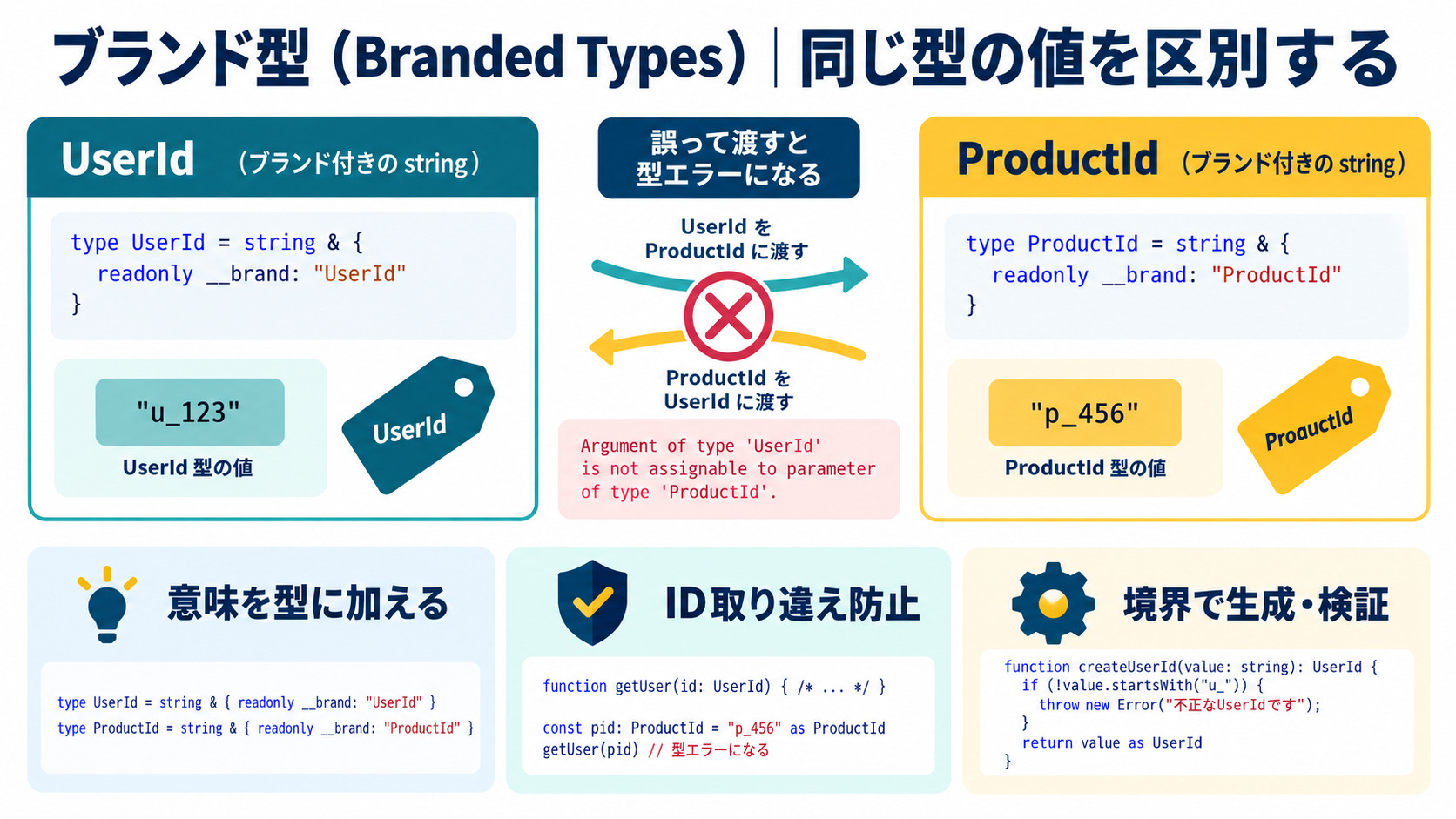
>// ブランド型:同じ型でも意味の異なる値を区別する

// 問題:PXとREMは両方numberだが、混在するとバグになる
function addSpacing(px: number, rem: number) {
  return px + rem  // バグ: 単位が違うのに加算してしまう可能性
}

// 解決:ブランド型で区別する
type Brand<T, TBrand extends string> = T & { __brand: TBrand }

type Px = Brand<number, 'Px'>
type Rem = Brand<number, 'Rem'>
type Hex = Brand<string, 'Hex'>  // "#RRGGBB"形式の色

// ファクトリ関数(バリデーション付き)
function px(value: number): Px {
  return value as Px
}
function rem(value: number): Rem {
  return value as Rem
}
function hex(value: string): Hex {
  if (!/^#[0-9A-Fa-f]{6}([0-9A-Fa-f]{2})?$/.test(value)) {
    throw new Error(`Invalid hex color: ${value}`)
  }
  return value as Hex
}

// 型安全な関数
function pxToRem(pixels: Px, baseFontSize: Px = px(16)): Rem {
  return rem(pixels / baseFontSize)
}

function applyBackgroundColor(element: HTMLElement, color: Hex): void {
  element.style.backgroundColor = color
}

// 使い方
const spacing = px(16)          // 型: Px
const fontSize = rem(1.5)       // 型: Rem
const color = hex('#3B82F6')    // 型: Hex

applyBackgroundColor(div, color)      // ✅ OK
applyBackgroundColor(div, '#3B82F6') // ❌ エラー: string は Hex に代入不可
applyBackgroundColor(div, '#gggggg') // ❌ hex() でランタイムエラー(不正なhex)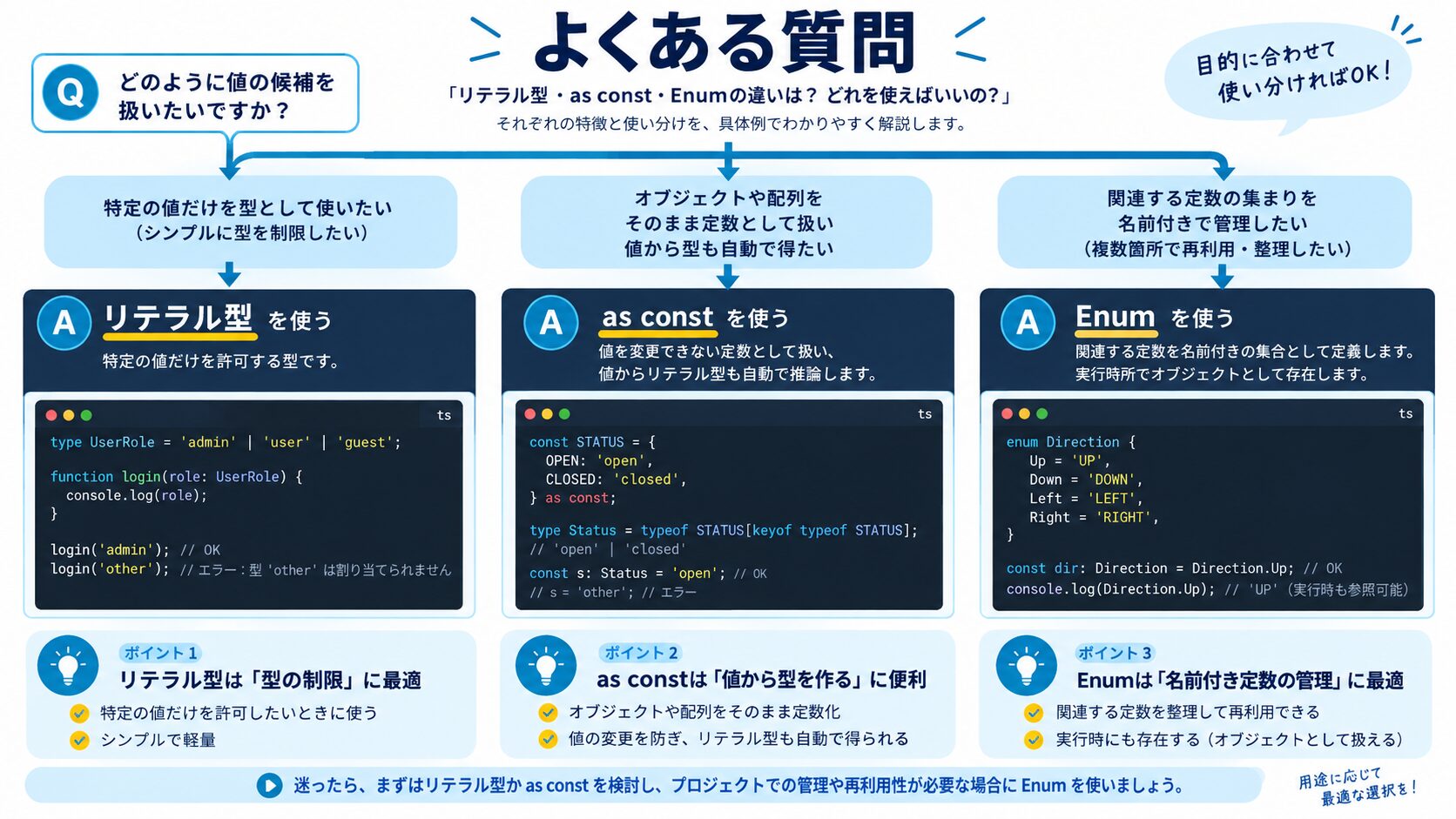
数値Enumは避けてください。バンドルサイズが増加し、値が数値になるためJSONシリアライズで問題が起きやすいです。シンプルな列挙なら文字列リテラル型(Union)、意味のある定数名が必要ならconst Object + as constのEnumパターンがベストです。チームで方針を統一することが最も重要で、どちらも間違いではありません。
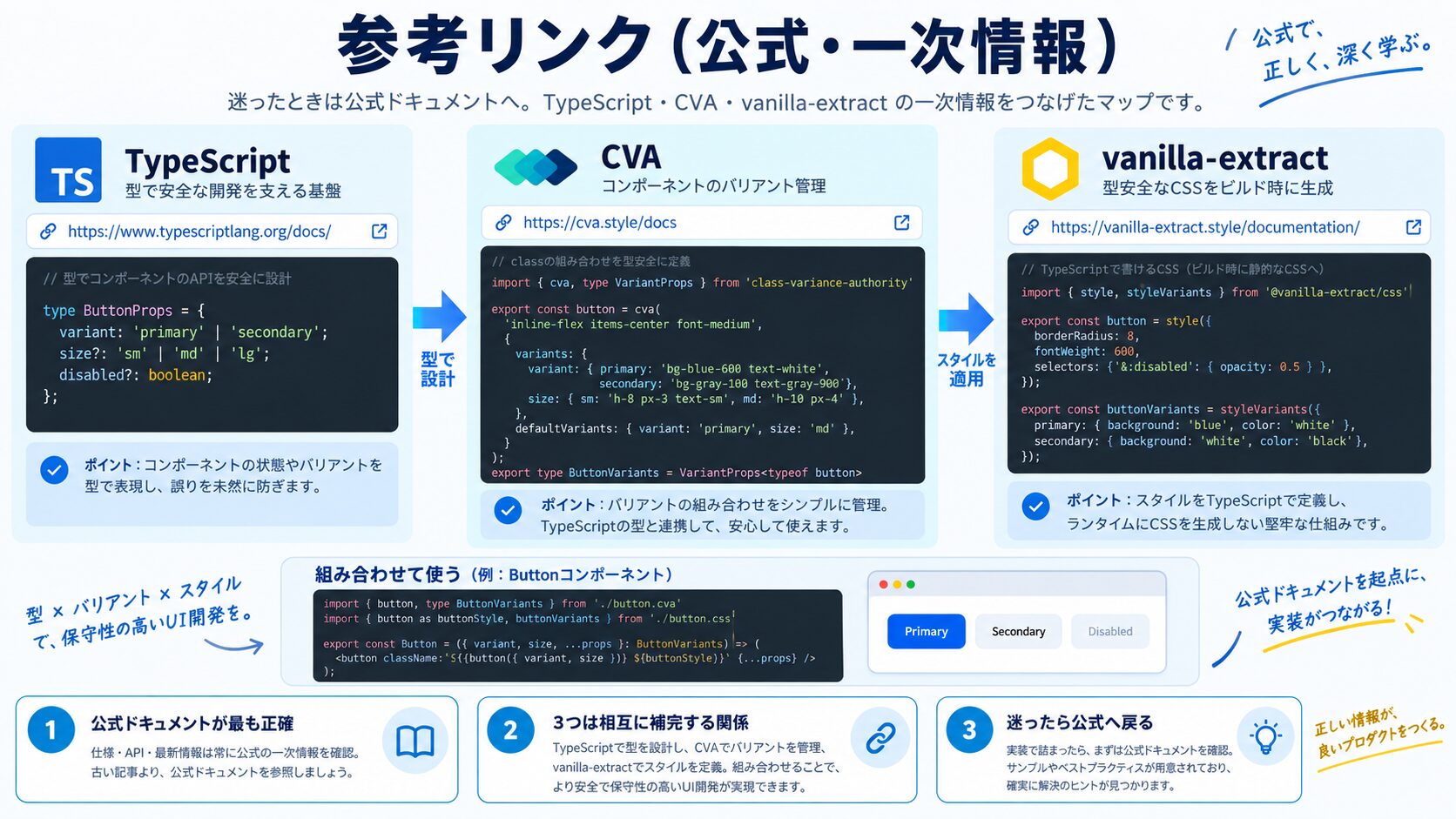
いくつかのアプローチがあります。①cva(class-variance-authority)を使ったバリアント管理(本記事のButtonコンポーネント例)②tailwind-variantsライブラリ(cvaの機能強化版)③clsx + tailwind-mergeの組み合わせで動的クラス生成。クラス名文字列全体を型付けするのは難しいため、「バリアント名」をリテラル型で管理し、クラス文字列への変換はcvaなどのライブラリに任せるアプローチが現実的です。
理論上は可能ですが、Tailwindは1万種類以上のクラスがあるため、全クラスをテンプレートリテラル型で定義するとTypeScriptのパフォーマンスに深刻な影響が出ます。代わりにtailwind-classnamesやtailwind-tsなどのライブラリが自動生成した型定義を利用するか、cvaでバリアント単位で管理する方法を推奨します。「どのクラスを使うか」を制限するよりも「どのバリアントを選ぶか」を制限する方が管理しやすいです。
vanilla-extractは成熟した選択肢で、TypeScript完全対応・ゼロランタイム・SSR対応が特徴です。Next.jsやAstroとの統合事例が豊富で、既存CSS-in-JSからの移行にも向いています。Panda CSSはTailwindライクなトークン設計で設定ファイルベースのアプローチです。新規プロジェクトでTailwindの型安全版を求めるならPanda CSS、既存のCSS-in-JS環境を移行するならvanilla-extractを選ぶと良いでしょう。
同じプリミティブ型(numberやstring)でも意味が異なる値を区別したいときに有効です。代表的なケースとして①CSS単位の混在防止(PxとRem)②ID値の混在防止(UserId vs ArticleId)③フォーマット済み文字列の管理(HexカラーコードやURL)があります。すべての値にブランド型を付けると複雑になるため、バグが起きやすい箇所に限定して導入するのがおすすめです。
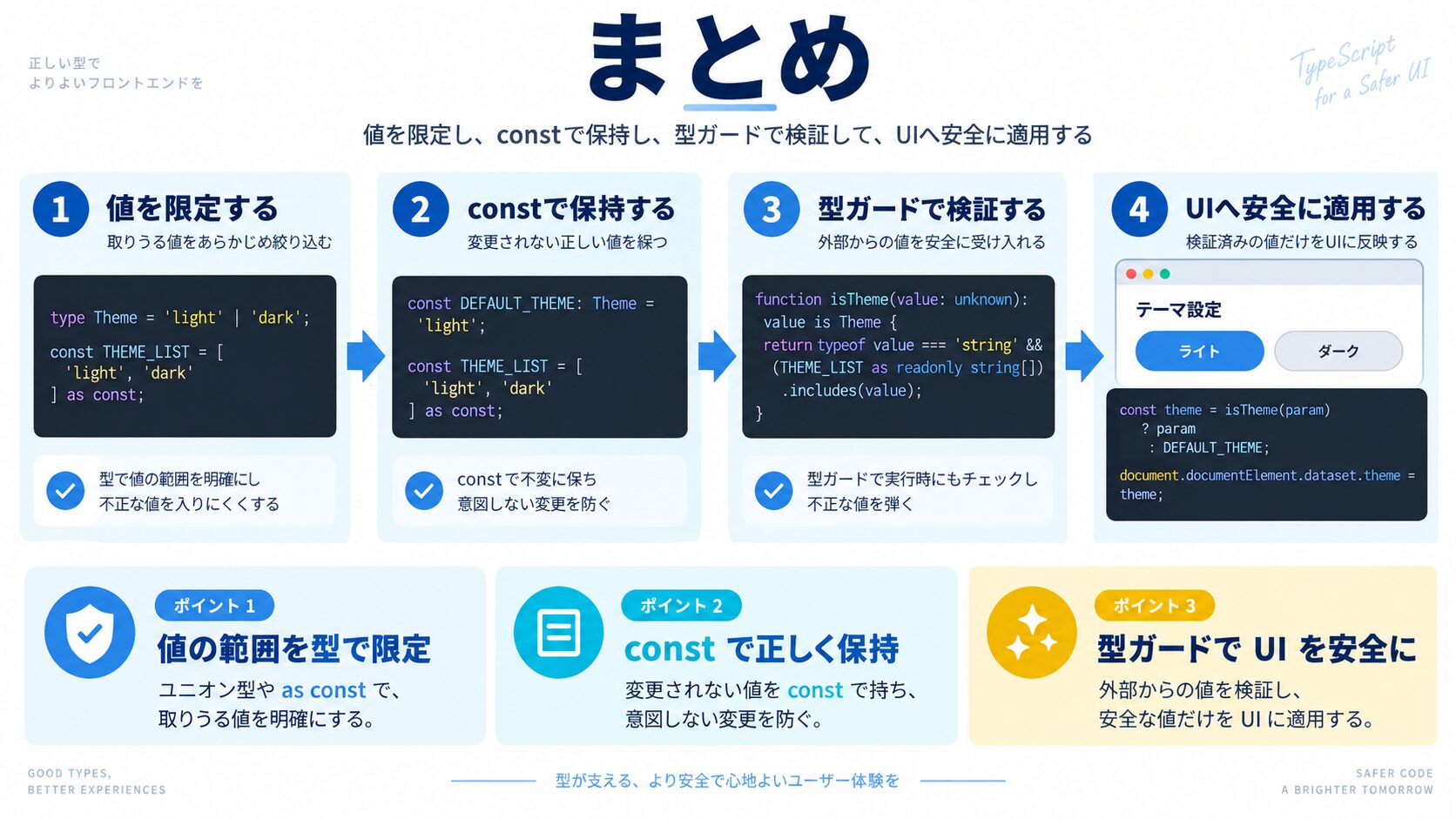
TypeScriptのリテラル型でCSSクラス名・カラー値・スペーシング・バリアントを型付けすることで、「スタイルのタイポ」「存在しないバリアントの指定」「デザイントークンの誤用」というよくあるバグをコンパイル時に防げます。まずはCategoryやStatusのような列挙値からリテラル型への移行を始めてみましょう。

目的に合わせて選べる「AI副業」「AI転職」「AI活用」の3コースを用意。副収入・キャリアチェンジ・日常の生産性アップまで、あなたのゴールに合わせてAIを学べます。
会員登録はカンタン30秒で完了します。まずは公式LINEから、無料でAI学習をスタートしましょう!
公式サイト より
今すぐ
無料カウンセリング
を予約!